
1. Start with a short story
Your first comic should be short. Aim for 4 to 8 pages: long enough to tell a complete story, short enough to finish. Most finished comics fail at the planning stage, not the drawing stage, so keep the idea small.
A strong short comic needs only three things: a character the reader can recognise at a glance, something they want, and a change by the last page. Write that in one sentence before anything else. Ours was: a lighthouse keeper finds a compass that points to her lighthouse instead of north, and follows it to a hidden garden.
Then sketch the main character. Pick two or three visual details that never change, such as hair, a coat or a scarf, so readers recognise them in every panel.
2. Write a page-by-page script
A comic script tells you what appears on each page and in each panel. Split the story into pages first, then into panels. Write what the reader sees, then any dialogue or captions. Keep each panel to one action.
PAGE ONE (six panels)

Panel 1. Sunrise. Mira, a lighthouse keeper in a navy coat
and yellow scarf, finds an empty rowboat on the beach.

Panel 2. Close on a small brass compass in the boat.
The needle points at the lighthouse.
MIRA: That is not north.

Panel 3. Mira climbs the spiral stairs, compass in hand.
End each page on a small question or turn so the reader wants to turn it. In our example, page one ends with Mira finding a keyhole in the lamp and asking, “What are you trying to show me?”
Keep dialogue short. Two short balloons per panel is plenty; if a character needs to say more, give them another panel.
3. Plan your page layouts
Before drawing, decide how many panels each page needs and how big they are. Bigger panels make moments feel more important. Draw tiny rough versions of every page, called thumbnails, to check the story flows before you commit to full-size art.
- Six panels: the everyday story page. Enough room for action and dialogue.
- Four panels: bigger art, more room for conversation.
- Three stacked panels: wide shots and slow, dramatic moments.
- Story page: an illustration with space for narration.
- Full page: a splash for the big reveal or the opening shot.
Mix layouts across the book. A run of identical six-panel pages reads evenly; switching to three wide panels or a full page slows the reader down for the moments that matter.
To draw by hand, print the free blank comic book pages, which mix these layouts in one PDF, or pick a single layout with the comic book template. For short gag strips, use the comic strip template instead.
4. Draw or generate the art
Traditional comic art is made in three passes. Pencil loosely first to get poses and placement right. Ink over the pencils with clean lines, then erase the pencil. Finally, add colour or leave the page black and white. Leave space at the top of each panel for speech balloons so they don’t cover faces.
If you can’t draw, or want to see your script on the page quickly, an AI comic generator can draw it for you. In Create Comic you describe what happens on a page, pick one of the same layouts and an art style, and it generates the finished page with the dialogue lettered in. This is page one of our example, generated from a single paragraph:
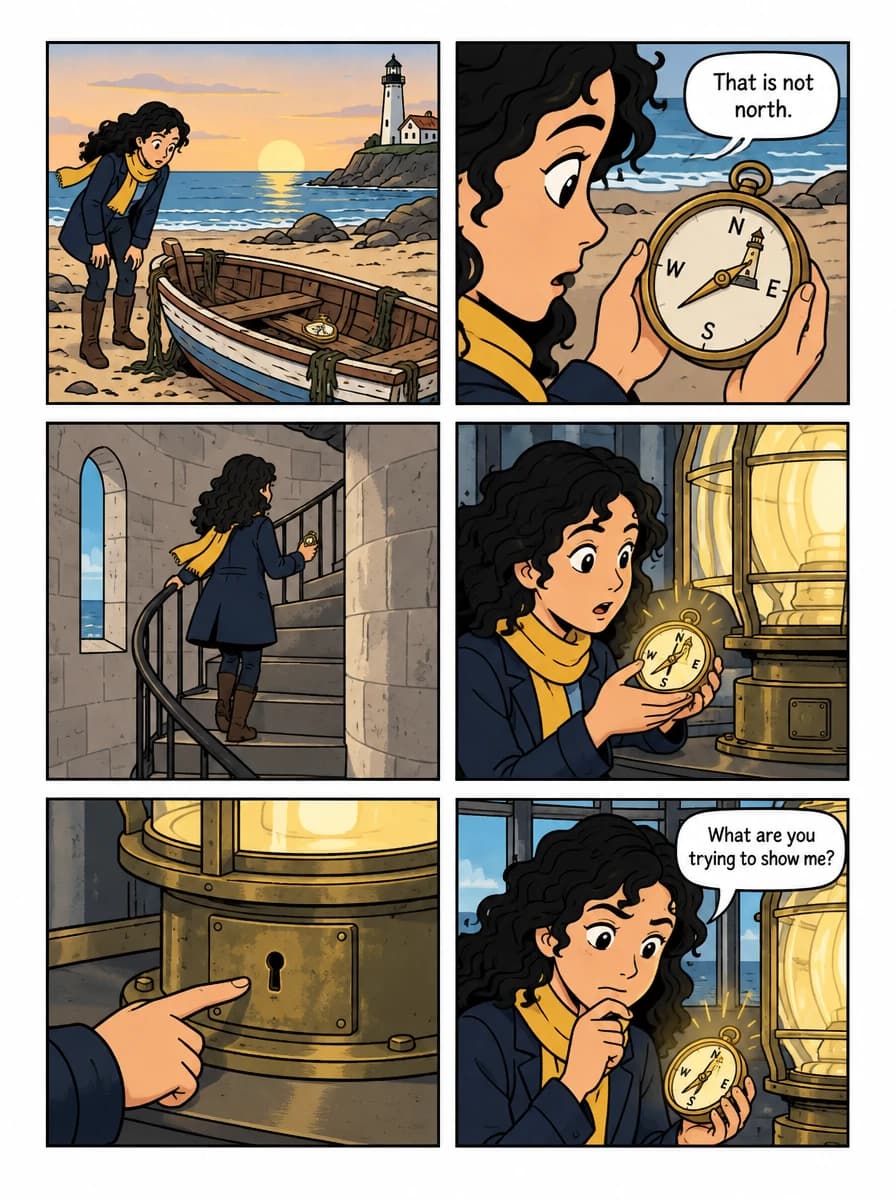
The text-to-comic walkthrough shows the exact prompts, how to continue the story on page two and how to fix a single panel.
5. Add lettering
Lettering is the dialogue, captions and sound effects. Readers follow balloons left to right and top to bottom, so place the first speaker’s balloon on the left. Use speech balloons with a tail pointing to the speaker’s mouth, cloud-shaped thought balloons, and rectangular caption boxes for narration.
Write in all capitals or a clear comic font, keep the same size throughout, and leave a margin inside every balloon. If you drew on paper, scan the pages and add balloons digitally with the free speech bubble maker.
6. Make a cover
The cover sells the comic. Show the main character in a moment that hints at the story, leave clear space for the title, and keep the title large enough to read as a thumbnail. Draw the cover last, once you know the story’s strongest image.
7. Print or share it
To share digitally, combine your page images into a single PDF with images to comic PDF, or package them as a CBZ for comic reader apps with images to CBZ.
To print a stapled booklet at home, make the page count a multiple of four, including the covers, and print double-sided. Print shops can also print a short run from a PDF. Create Comic exports a 5 × 8-inch print PDF and a Kindle EPUB directly from the studio.
Turn your script into pages
Write what happens on the page and Create Comic draws it in the layout and art style you choose. Your first generation is free.
Make your comic book